For businesses running daily work across spreadsheets, messages and tools that do not talk to each other.
Connected systems for your daily work, from customer records and sales to stock, staff and reporting.
We build software that brings a business's daily work into one connected system: customer records, orders, bookings, tasks, approvals and reporting. CRM, customer relationship management, tracks enquiries, contacts, deals and follow-up. An API is the supported way for two systems to exchange information, and we use APIs to connect the software you already use.
Timeline
Set in your Consultation plan
Engagement
Consultation, then mapping, the first module, connections and rollout
Investment
Set in your Consultation plan
Why Teams Come To Us
- Teams running core work on spreadsheets and messages
- Businesses whose tools do not share customer, sales or stock records
- Owners who want their key numbers in one place
Outcomes We Usually Move
- Less copy-paste and manual tracking
- One connected system for the work and the numbers
- Systems added one module at a time
Not For
- Teams looking for a finished ERP or payroll product off the shelf
- Projects where nobody owns the process the system is meant to follow
- A dashboard that is expected to replace the accounting system behind it
Standards
How we build business systems
Map the Work First
A system should follow how the business runs, not the other way round.
One Module at a Time
Big systems fail when everything changes at once.
Connect Before Replacing
The tools you already pay for often stay.
Scoped Before It Is Promised
ERP, inventory, payroll and POS work has details that matter.
Reports People Use
A report should help someone decide.
Proof
What this looks like in practice

Dashboards and reporting
Activity from your tools on one screen, for the people who manage the work.
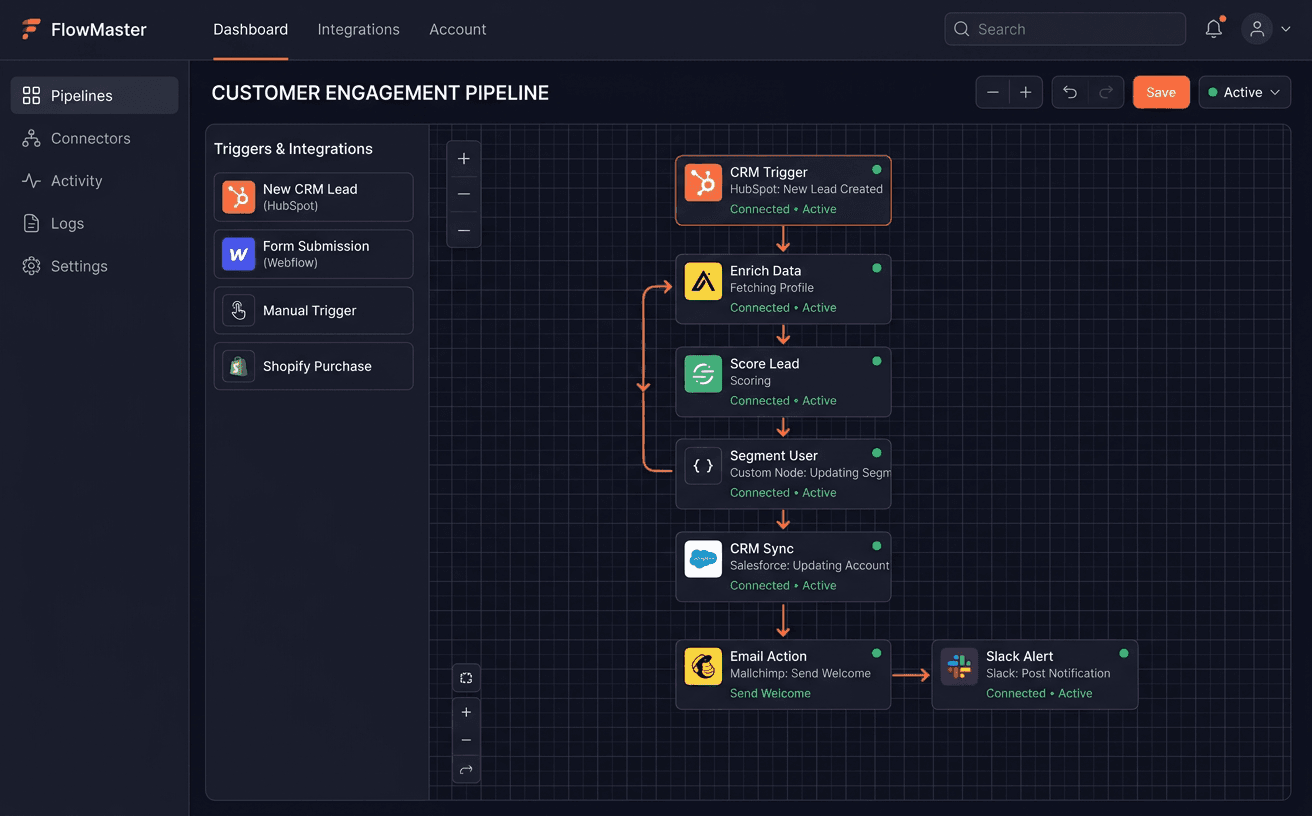
Systems connected
CRM, accounting, payments and messaging linked, so data is entered once.

Screens for daily work
Orders, tasks and approvals in clear screens, with roles and permissions.

Integrations you can check
A record of what moved between systems, with alerts when something fails.
Not sure you need a new system?
Sometimes connecting two tools you already pay for is enough. The Consultation tells you which.
How a business systems project runs
Discovery
- Departments, workflows and approvals written down
- The tools you use today and what each one can do
- What to build, what to configure and what to connect
Plan the First Module
- The module or integration that saves the most time
- Data model, roles and the data to move across
- A rollout plan for each team
Build and Connect
- Screens, records and approvals built and tested
- Connections to CRM, accounting, payment, POS or HR tools
- Error handling, logging and alerts
Roll Out and Extend
- Rollout with each team, one group at a time
- Training, documentation and handover
- The next module, in an agreed phase
Consultation
What we look at in your Consultation
Before anything is built, we look at how work moves between your teams and tools today.
How orders and requests move
Where the team loses time
Tools you already use
Where your data lives
Approvals and access
What to build, configure or connect
The Consultation is software discovery and product planning. You get your requirements and user journeys written down, what to build and what can be bought, how your systems connect, the build cost and a rollout plan.
Typical Build Stack
FAQ
Frequently asked questions
Do you build ERP systems?
We scope and build selected ERP modules and integrations that connect orders, purchasing, stock and finance. A full ERP needs module definitions, data migration and accounting rules agreed first, so we plan it in phases.
Can you work with the CRM we already have?
Usually, yes. We can configure and connect your existing CRM, or build a custom one when your sales process does not fit a ready-made product.
Do you build inventory, HR or POS systems?
We scope and build them. Inventory and procurement, HR and payroll workflows, and POS and retail integration each start with the details that matter, such as suppliers, payroll rules, devices and tax settings.
How much does a business system cost?
It depends on the modules, users, integrations and data to move across. You get the build cost and the rollout plan after the Consultation, before anything is agreed.
Who owns the system and the data?
You do. The code, the database and every connected account sit in your name, with documentation at handover.
Process
What happens after you book
Every project starts the same way, and you decide at each step.
Step 1
Consultation
We go through how the business runs, which teams are involved and which tools you already use.
Step 2
Your plan
You get a plan with the first module or integration, what can be bought or reused, the build cost and the rollout.
Step 3
Build
Once you agree the plan, we build and connect the first module, then add the rest in agreed phases.
Step 4
Grow
With the daily work connected, we can help you bring in more customers through lead generation and marketing.
Start with a Consultation. We map how the work moves today, then tell you what to build, configure or connect.
Snapshot
Engagement Snapshot
Timeline
Set in your Consultation plan
Engagement
Consultation, then mapping, the first module, connections and rollout
Investment
Set in your Consultation plan
Handoff
Code, database, integrations, documentation and a walkthrough
Next step
Not sure this is what you need?
Book a Consultation. We look at your business first, then plan what to build and what can be bought.
You get a plan: requirements, what to build and what can be bought, the cost and the rollout plan.